How to teach online group classes where everyone works
How to teach online group classes of 3 to 10: give every student their own task, spot who is stuck, pace the lesson, and call on quiet students fairly.
By Gomently Team11 min read


How do you teach an online group class? Give every student their own task on their own screen, and watch their work rather than their faces, so you know who needs you. Everything else in this guide builds on those two habits.
This guide is for tutors who have taught one to one for a while and are now starting groups of 3 to 10 online. Language tutors will recognise most of the examples, but the steps work for any subject.
Three things change when you move from one student to a group:
- You can no longer wait for one person. In one to one, the lesson moves at your student's pace. In a group, waiting for one student means five others sit idle.
- Attention splits. While you help one student, the rest are either working or drifting. There is little in between.
- Quiet students hide. A confident student will happily answer every question. The quiet one learns that silence is safe.
By the end of this guide you will be able to plan a lesson where everyone has a task of their own, see who is stuck without asking "Is everyone OK?", pace a 60 minute lesson in blocks, call on quiet students fairly and warmly, use short pair exchanges, and end on time with homework that fits each student.
How do I keep every student busy, not just watching?
Students usually get more from doing a task than from listening to you explain. Even classroom discussion counts as active learning; one paper calls it "perhaps the most frequently used 'active learning' strategy". But in an online group, a discussion often means one student talks while the others watch. Individual tasks fix that.
A rule of thumb that works well: talk for a few minutes, then everyone does a task. If you notice you have been explaining for more than five minutes, stop and give the group something to do.
Worked example: a B1 group of six
Say your group of six is working on past simple versus present perfect.
- Spend three or four minutes on the rule with two clear examples on screen.
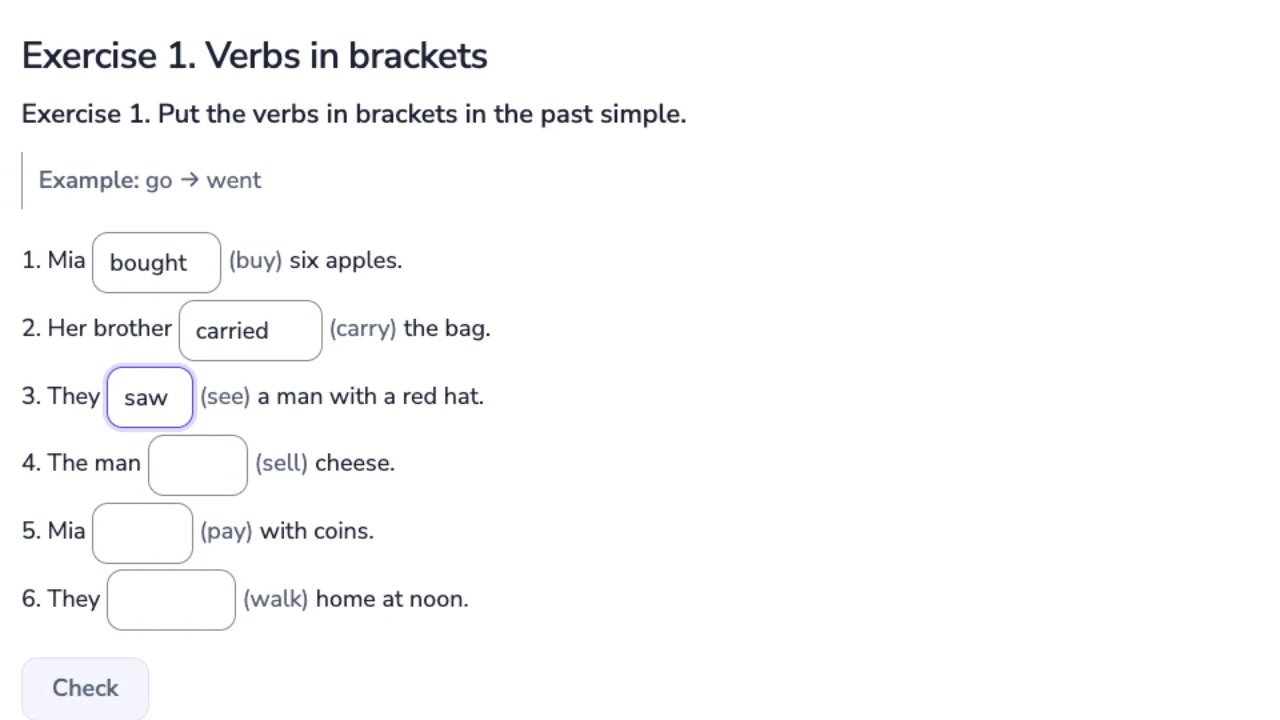
- Give each student their own copy of a gap-fill. For instance: "Yesterday I ___ (walk) to the park. Then I ___ (not go) home." Each student types the verb form into their own copy.
- While they work, you watch the answers come in rather than the cameras.
- When most are done, go round the group: each student reads one sentence aloud and says why they chose that tense.
Everyone has worked before anyone speaks. The comparing aloud then becomes a check, not a quiz on the spot.
For a mixed group, try a gentler version first: a gap-fill where students choose rather than invent, such as "Choose have or has." It is quick, low stakes and gives weaker students an easy start.
Have an extension task ready
In every group, someone finishes first. If they have nothing to do, they wait, and waiting turns into chatting or checking their phone. Before class, prepare one extension task for fast finishers. A longer matching set of verbs and their past forms (buy and bought, and so on) works well: it needs no new explanation and keeps practising the same point.
For more task ideas, see interactive activities for online lessons that work.
How do I see who is stuck without asking?
"Is everyone OK?" almost always gets silence or a polite "yes". Students who are stuck rarely say so in front of others. So stop asking, and design tasks that show progress instead.
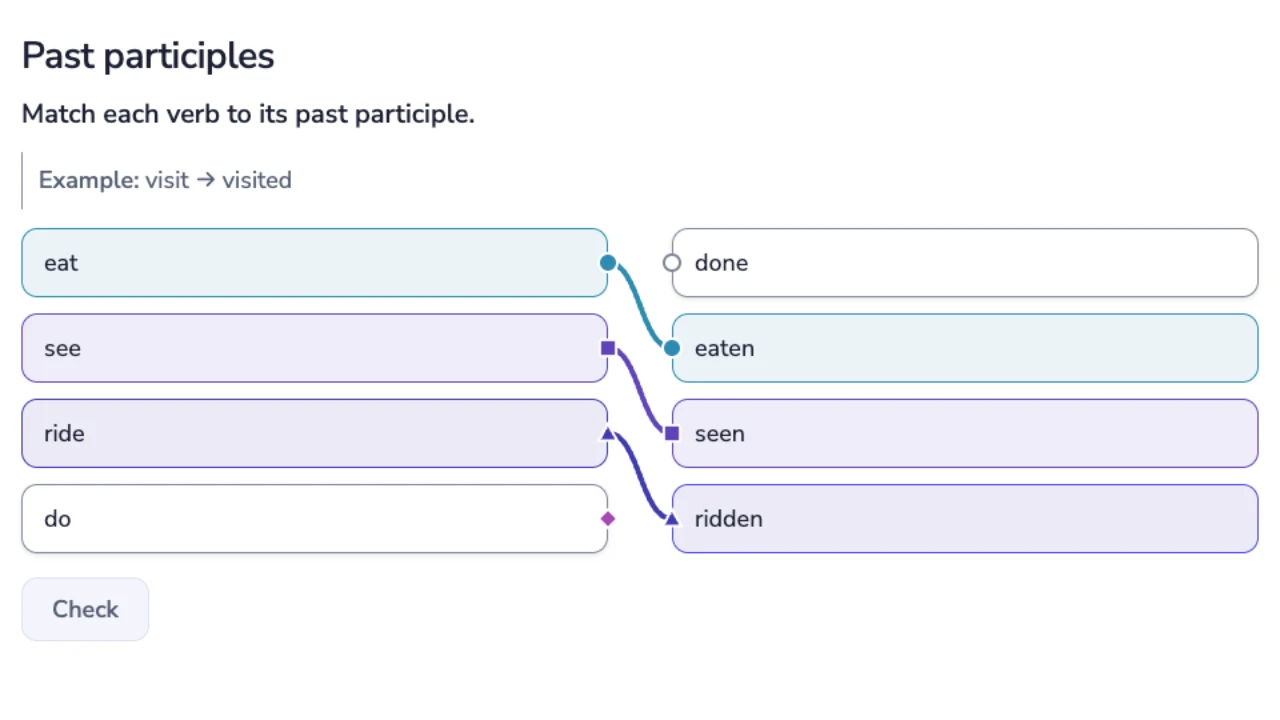
A good task makes progress visible: answers fill in, pairs connect, items move into groups. When you can see the work, you can see who has stopped.
Watch for two signals:
- A student who stops. Half the answers done, then nothing for a minute or two. That student is usually stuck on one item.
- A student who finishes too fast. Either the task was too easy for them, or they guessed. Check one or two of their answers.
Worked example: an A2 matching task
Say your A2 group of five has a task: "Match the verb to its past." After three minutes, three students are nearly done. Two have half their pairs empty.
Do not announce it to the group. Go to the first student, look at which pairs are empty, and give one small hint: "Look at 'go'. It doesn't end in -ed." Then go to the second. The others keep working, and nobody is singled out in public.
Add a quick signal
Give students a simple, private-feeling way to say "I need you": a raised hand, or a one word chat message like "help" or "stuck". Agree on it in the first lesson and remind them often. Some students find it easier to type one word than to interrupt the class out loud.
How should I pace a group lesson online?
In one to one you can follow your student's energy. In a group you need a structure everyone can see. Plan in blocks:
- Input: you explain or show, briefly.
- Individual task: everyone works on their own.
- Check together: answers shared, mistakes discussed.
- Speaking: students use the language aloud.
Then repeat the cycle with the next point.

Move the whole group on together. Set a visible time for each task, for example five minutes, and say it out loud: "Five minutes for this one." When the time is up, move on, even if one student is not quite finished. They can finish during the check.
Worked example: a 60 minute lesson for a teen A2 group
Say your group of seven teenagers is learning past simple regular and irregular verbs.
- 0–5 min, warm-up: everyone writes one thing they did last weekend in the chat.
- 5–12 min, input: regular -ed verbs and five common irregular ones.
- 12–20 min, individual task: sort the verbs into -ed and other.
- 20–25 min, check together: go through the sort; each student explains one verb.
- 25–35 min, individual task: a gap-fill story in the past.
- 35–45 min, speaking: students ask each other "What did you do on Saturday?" in turn.
- 45–50 min, game or extension: a quick challenge with the irregular verbs.
- 50–60 min, wrap-up: a short check everyone answers, one sentence each about what they learned, and homework.
Cut, do not rush
Decide before class which section you will drop if time runs short. In the plan above, the game block is the natural cut. Rushing through every section teaches less than doing four sections properly. Write "cut if late" next to one block in your plan, and you will never have to decide under pressure.
How do I get quiet students to speak?
Cold calling means asking a question and then naming a student to answer, rather than waiting for volunteers. Many tutors avoid it. One study notes that "some instructors resist cold-calling fearing that the student will feel uncomfortable".
The same study, done in higher education, found that "significantly more students answer questions voluntarily in classes with high cold-calling", and that this number grew over time. It also reports that "cold-calling can be done fairly extensively without making students uncomfortable."
Be careful with that finding. As The Learning Scientists point out, the study was correlational, so "we do not know whether cold calling caused increases in participation". Still, the same post argues that asking questions and "encouraging students to covertly retrieve through cold calling, ought to improve learning from a lesson". When everyone might be called, everyone thinks of an answer.
Do it warmly
The order matters: ask the question, pause, then name the student. If you name first, everyone else relaxes. If you ask first and pause, every student has to think.
Keep the tone kind. "Ana, what do you think?" is an invitation. If a student is stuck, help them: give a choice of two, or come back to them after someone else.
Let them write first
Thinking time helps quiet students most. Better still, let them write before they speak. The Learning Scientists post says that writing answers out, rather than thinking silently, "probably should be used whenever possible." A student who has written a sentence has something ready to say.
Vary the name order
If you always go round the group in the same order, students work out when their turn is and switch off until then. Mix it up. Call a student twice in a row sometimes. Keep a small tally on paper so that, over the lesson, everyone speaks about the same amount.
Worked example: C1 adults
Say your C1 group of six is discussing remote work.
- Ask one opinion question: "Should companies let everyone work from home?"
- Give one minute. Everyone writes one sentence in the chat, an answer in one line.
- Read the chat yourself. Pick two students, perhaps one who wrote something unusual and one who rarely speaks.
- Call them by name: "Tom, you wrote that it depends on the job. Can you say more?"
Everyone has committed to an answer. The quiet student is not caught off guard: they are asked to expand on something they already wrote.
A quick vote works too. Ask the group to pick an option, then call on one student from each side to explain.
How do I run short speaking exchanges in a group?
Yes, in a simple form that keeps the whole group together. Instead of sending pairs away, run short exchanges in front of everyone: Student A asks Student B, B answers, then they swap. Keep each exchange short.
Worked example: A1 children
Say your group of five children is learning "What's your favourite...?"
- Model it once: "What's your favourite colour?" "My favourite colour is blue."
- Start a chain. Student 1 asks Student 2. Student 2 answers, then asks Student 3, and so on around the class.
- Change the topic each round: colour, animal, food.
For very young learners, warm up with a picture matching task first ("Match the picture to its word") so the vocabulary is fresh before they speak.
Give listeners a job
Keep pairs short, and give everyone else a task while they listen. For example: "Write down one person's favourite animal." Then ask a listener: "What is Mia's favourite animal?" Now the whole group is listening for a reason.
How do I end an online group class on time?
Group classes often run over, because every task takes a little longer than planned. Build in a firm end.
- Stop new material ten minutes before the end. Whatever you have not covered goes into the next lesson.
- Close with a short check everyone answers. Three quick questions on today's point, done individually, show you who got it.
- Ask for one sentence each. "Today I learned..." in the chat or aloud. It takes two minutes and tells you a lot.
- Fit the homework to the mistakes you saw. If two students mixed up past simple and present perfect, give them more of that. If one student was solid, give them something harder. The same sheet for everyone wastes time for half the group.
Mistakes to avoid
- Teaching the group as one big one to one student. Questions to "everyone" get answers from one.
- Asking "Any questions?" and moving on. Silence does not mean understanding. Use a short check instead.
- Always calling on the same confident student. It feels efficient. It teaches the rest to wait.
- Tasks only one person can do at a time. One student at the board while five watch is five students not working.
- Running over time to finish a slide. Cut the slide. End on time.
Where Gomently helps
Everything above works with any tools. Here is how this looks in Gomently:
- Students join with one link and the name they type: no account, no email, no PIN and nothing to install.
- Each student works on the lesson on their own device, while you move the class from section to section.
- A live view shows who is working, done, needs help or has a hand up, and how far each student is.
- You see every student's status and progress at once and can open any one student's live screen.
- You can take over one student's task to show the way, and hand it back.
- You can put one student's screen in front of the whole class and hand that student the marker.
- Students can raise a hand and write in the class chat, and you can send quick emoji reactions.
- Language lessons use ready-made tasks such as filling gaps, matching, sorting, putting in order and multiple choice.
- After class, Gomently prepares a report card for each student for you: what went well, what to work on, repeated mistakes, and personal homework.
- Each student's homework is written from the mistakes they made, ready for you to pass on.
LiveEnglish B1 · The lost key
Sofia
Noor
Tutors moving to groups can read more on our page for tutors, and the live view and class room are described on the features page.
FAQ
How many students is best for an online group class?
Small groups of 3 to 10 let each student speak often while you still keep an eye on everyone's work. Below three, it feels like one to one; above ten, speaking turns get rare.
How do I stop one student dominating?
Use a varied name calling order so turns are shared, and ask for written answers first. When everyone has written, you choose who speaks, not the fastest voice.
What if a student's connection drops?
Carry on with the group, and when the student is back, give them a quick summary of what they missed and point them to the current task. In Gomently, if a student's connection drops or they reload, their work is kept on their device and catches up when they are back.